
Generate Breadcrumbs from Astro URL
A breadcrumb list shows a webpage’s position a website’s page hierarchy. Each breadcrumb links to a page in the hierarchy, allowing users to more easily navigate a website. Google can display breadcrumbs directly in search results.
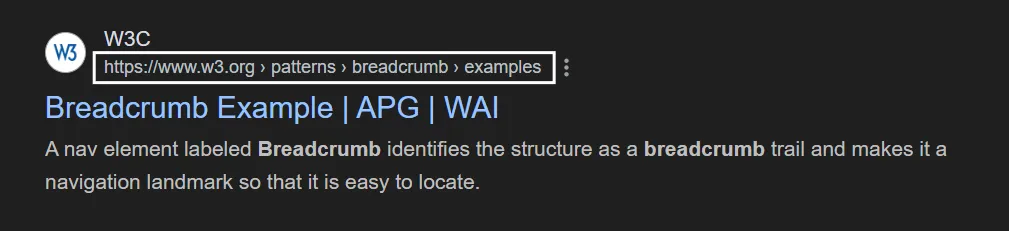
We use structured metadata in the head of a webpage to tell search engines what our breadcrumb list is. With Astro’s url object, we can generate this metadata automatically at build-time.
Recipe
- Create a
Headcomponent to hold your breadcrumb structured data.
<head> <title>Page Title</title> <meta name="description" content="Description of the page." /></head>- Retrieve the
Astro.urlof the current page in yourHeadcomponent.Astro.url.originis the base url for the website.Astro.url.pathnameis the relative path to the current page.
---const origin = Astro.url.origin;const path = Astro.url.pathname;---
<head> <title>Page Title</title> <meta name="description" content="Description of the page." /></head>- Split the path into a list of route names.
---const { origin, pathname } = Astro.url;let currentPath = origin + "/";const breadcrumbData = pathname .split("/") .filter((s) => s.length > 0) .map((pathname, index) => { currentPath += index == 0 ? pathname : "/" + pathname; return { "@type": "ListItem", position: index + 1, name: pathname, item: currentPath, };});---
<head> <title>Page Title</title> <meta name="description" content="Description of the page." /></head>- Filter out any empty strings created by leading and trailing slashes.
---const { origin, pathname } = Astro.url;let currentPath = origin + "/";const breadcrumbData = pathname .split("/") .filter((s) => s.length > 0) .map((pathname, index) => { currentPath += index == 0 ? pathname : "/" + pathname; return { "@type": "ListItem", position: index + 1, name: pathname, item: currentPath, };});---
<head> <title>Page Title</title> <meta name="description" content="Description of the page." /></head>-
The breadcrumb metadata requires a list of objects representing each level in the path. Always set
@typeto"ListItem". Position is the index of the object starting at 1. Thenamefield will be displayed in the generated breadcrumb menu. Theitemfield holds the URL for each level of the path.Generate an array of ListItem objects from pathname using the
mapfunction.
---const { origin, pathname } = Astro.url;let currentPath = origin + "/";const breadcrumbData = pathname .split("/") .filter((s) => s.length > 0) .map((pathname, index) => { currentPath += index == 0 ? pathname : "/" + pathname; return { "@type": "ListItem", position: index + 1, name: pathname, item: currentPath, };});---
<head> <title>Page Title</title> <meta name="description" content="Description of the page." /></head>-
The final structured data must have three fields:
@context,@schema, anditemListElement. The first two fields are constants, and the third field holds thebreadcrumbDatalist we created.We create the data object
structuredData, stringify it, and use Astro’sset:htmlfunction to render it in ourHeadcomponent. Our structured data will be added with a script tag of typeapplication/ld+json, which Google recommends.
---const { origin, pathname } = Astro.url;let currentPath = origin + "/";const breadcrumbData = pathname .split("/") .filter((s) => s.length > 0) .map((pathname, index) => { currentPath += index == 0 ? pathname : "/" + pathname; return { "@type": "ListItem", position: index + 1, name: pathname, item: currentPath, };});
const structuredData = { "@context": "https://schema.org", "@type": "BreadcrumbList", itemListElement: breadcrumbData};---
<head> <title>Page Title</title> <meta name="description" content="Description of the page." /> <script type="application/ld+json" set:html={JSON.stringify(structuredData)} /></head>- Call your
Headcomponent in your layout or page.
---import Head from "@components/Head.astro";---
<!doctype html><html> <Head /> <body> <main> <slot /> </main> </body></html>